
Three Tools, One CVE, Three Answers: Why I Built SignalDeck
The same CVE shows up in Iru, Kolide, and SentinelOne with different names. SignalDeck puts them in one place so you can decide what to fix.
5 min read
Here is a morning I have had more than once. A critical CVE lands. I open Iru and see it on a MacBook called "eng-mbp-14." I open Kolide and find what looks like the same laptop under a serial number. I open SentinelOne and see a finding on a host with a third name, last synced at some point yesterday. (The names here are made up, but the morning is real.)
Is that one machine or three? Is the finding still open, or did someone patch it after the last sync? By the time I have an answer, I have spent twenty minutes matching records instead of fixing anything.
That gap is why I built SignalDeck.
Three versions of the truth
Each tool covers a different slice. Iru Vulnerability Management matches the apps on every Mac against NVD and ties detection straight to patching. Kolide, now 1Password Device Trust, checks whether a device is healthy before it can sign in. SentinelOne Singularity Vulnerability Management finds exposed apps and operating systems on the endpoints it already protects.
The trouble starts when you need all three at once. Small security teams have to answer a few plain questions every week:
- What needs attention first?
- Which assets are affected?
- Which tool reported it?
- Is that data current?
Those answers drive prioritization. They also become audit evidence. When an auditor asks how you track and fix vulnerabilities, "I check three consoles" is not a good answer. It is the same lesson from our AI code review and SOC 2 change management post: the control only counts if you can show it working.
What SignalDeck does
SignalDeck pulls findings from Iru, Kolide, and SentinelOne into one dashboard. It has four areas, each with its own page:
- Home shows a summary of exposure and is where an investigation starts.
- Vulnerabilities lets you search and filter findings, then open any one of them.
- Assets shows exposure by device, so you can see everything one laptop is carrying.
- Connections shows each integration, its sync status, and its ingestion history.
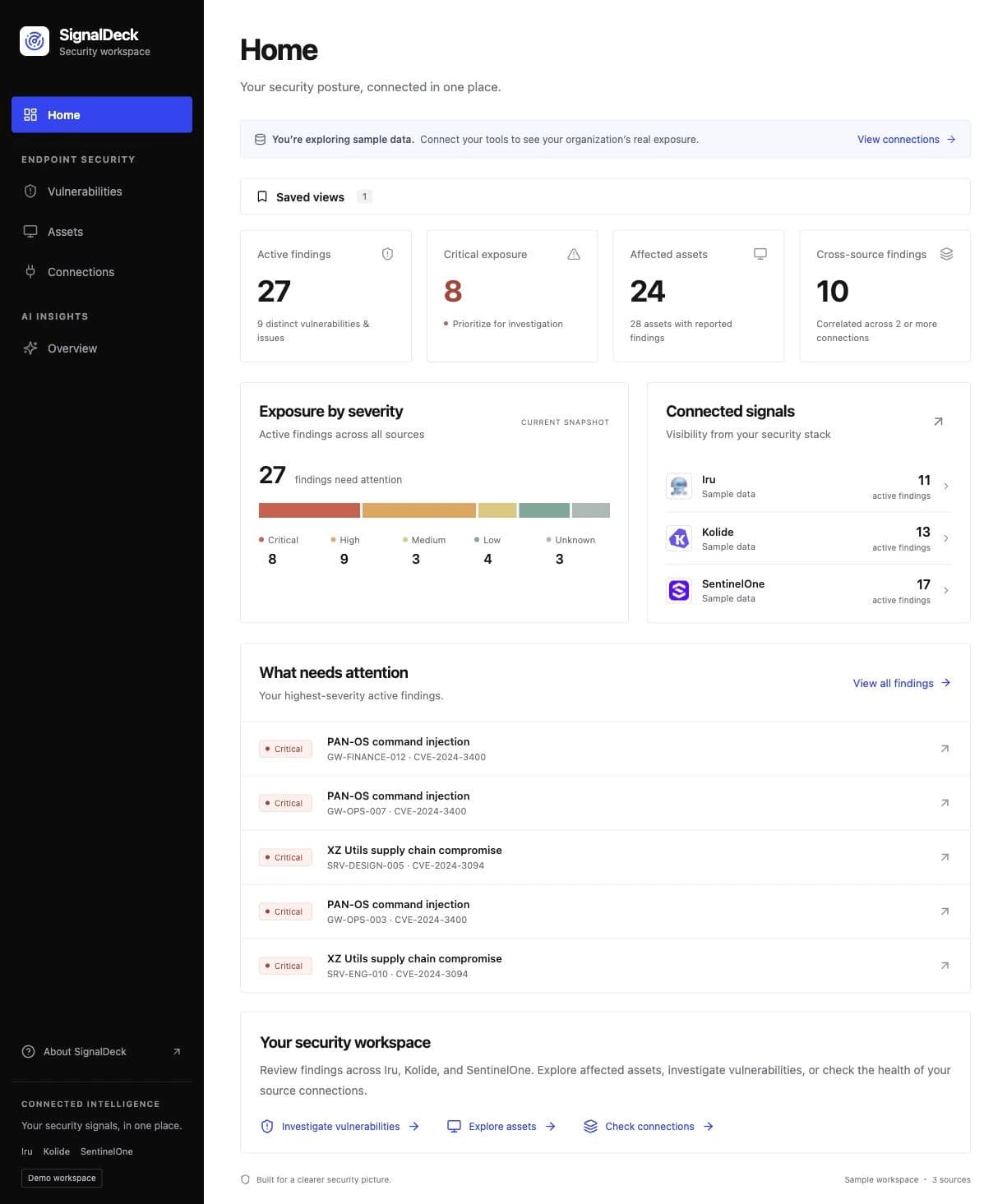
The flow follows how I actually work: start broad, narrow to one vulnerability, then look at the machines it touches. Take CVE-2024-3400, the PAN-OS flaw that sits in CISA's Known Exploited Vulnerabilities catalog. Or CVE-2024-3094, the XZ Utils backdoor. For findings like these, I want to go from the CVE to the affected assets in two clicks.
The design is plain on purpose: a dark sidebar, a light workspace, readable tables, and clear status labels. Security data is dense already. The screen should make it easier to scan. (The screenshots here use sample data, not a real customer environment.)
Keeping your place
The dashboard habit that annoys me most is losing my place. You filter a list, open a finding, hit back, and wait while everything reloads. Sometimes your filters and scroll position are gone too.
SignalDeck keeps that context. Filters live in the URL, so you can bookmark or share a view. Coming back from a detail page restores your spot in the list. Cached results cut repeat loading, and backend read views serve browsing without redoing the ingestion work each time you open a page.
It sounds small. Over a long investigation, it is the difference between following a thread and starting over five times.
Showing whether the data is fresh
A dashboard is only useful if you can trust it. That means knowing when a connector has quietly stopped working.
Every connection in SignalDeck has its own sync button and ingestion history. You can see recent runs and refresh one source without kicking off every integration. Browsing what you already collected stays separate from fetching new data, so opening the Vulnerabilities page never means downloading the whole inventory again.
That history doubles as evidence. If someone asks when SentinelOne data last came in, the answer is on the page.
Access through Okta
SignalDeck now supports Okta sign-in, so access is managed through normal app assignments in Okta.
It uses the server-side Authorization Code flow with PKCE (the spec is RFC 7636). Sessions are stored in PostgreSQL. Signing out deletes the SignalDeck session. The browser never holds access or refresh tokens.
A tool that collects security findings is itself an obvious target, so I held it to the same rules I write about elsewhere: its own identity, narrow access, and a clear trail. More on that thinking in least privilege for AI agents and our GitHub Actions hardening checklist.
Where it goes next
SignalDeck is still evolving. The direction is simple: make findings easier to investigate, make collection failures obvious, and keep the context people need to get the work done.
If you are juggling Iru, Kolide, and SentinelOne and want to see it, or you just want to tell me what your version of that morning looks like, Let’s talk.